Setting Paste and Match Style as default

One of the most annoying things about Mail.app application in Leopard is its paste with formatting feature. Some might find this useful, but I ended up with emails that looked like this!

Sample Mail

That’s surely unprofessional by any standard.

There’s already a simple fix for this however. You can just press Command + Option + Shift + V. Try that. Seriously. Try and press all that 4 buttons together. I don’t think anyone would want to repeat that command stroke every single time.

In order to set “Paste and Match Sytle” as the default paste command, just complete the following instructions:

  1. Launch System Preferences.
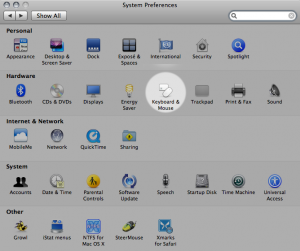
  2. Select Keyboard & Mouse.
    System Preferences - Keyboard & Mouse
  3. Select the Keyboard Shortcuts tab. Scroll down and select All Applications.
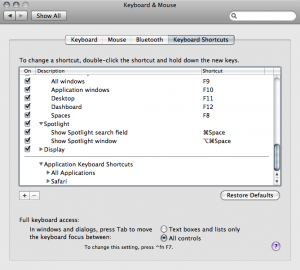
    Keyboard Shortcuts Tab
  4. Click on the small + box at the bottom left of the window.
  5. Fill up the dialog with the following details:
    Application: All Applications (Or the name of the application)
    Menu Title: Paste and Match Style
    Keyboard Shortcut: ⌘V (Command + V)
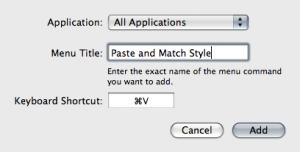
    Paste and Match Style Dialog

There you have it. Perfectly formatted pasted information in your mail (or any other applications that comes with the feature) all the time.

35 Comments

  1. Michael

    Hey, have you seen this news article?
    New details about Michael Jackson’s Death Emerge
    I was wondering if you were going to blog about this…

  2. I think i’ve seen this somewhere before…but it’s not bad at all

  3. If someone needs to do it via a script or ARD:

    defaults write .GlobalPreferences -dict-add NSUserKeyEquivalents “Paste and Match Style” -string “@v”

  4. For this purposes (and many more) I use PTHPasteboard. I can use their filters (remove formatting, unwrap lines, capitalize sentence or all text, sort lines, decode HTML entities, etc.) or create my own filters and assign shortcuts for pasting result. There’s also optional window for the last 100 clipboards which I can use with or without those filters. And even clipboard sharing between two or more Macs.

  5. Rather interesting. Has few times re-read for this purpose to remember. Thanks for interesting article. Waiting for trackback

  6. Great post however , I was wanting to know if you could write a litte more on this subject? I’d be very thankful if you could elaborate a little bit more. Bless you!

  7. A minute saved is a minute enaerd, and this saved hours!

  8. Thanks for the writeup about this. Greatly appreciated.

  9. Aw, this became an extremely good post. In thought I would like to set up writing like that in addition – taking time and actual effort to create a fantastic article

  10. Very interesting subject , regards for posting .

  11. This post really forced me to fill the gaps I had created on this subject. Been in search of like this forever speculate this topic is so obscure, hardly any folks are knowledgeable from it. Excellent work.

  12. I got what you will, thanks for putting up. Woh I am cheerful to exploit this website finished google. Thanks For Share Thaweesak.com » Setting Paste and Match Style as default.

Trackbacks for this post

  1. ForkBombr » Blog Archive » Paste and Match Style
  2. Twitted by ranchero
  3. TUAW Tip: Paste without formatting by default | Apple
  4. Apple Bloog » Blog Archive » TUAW Tip: Paste without formatting by default
  5. Technic News » TUAW Tip: Paste without formatting by default
  6. RSS News Portal » TUAW Tip: Paste without formatting by default
  7. Tech News World » TUAW Tip: Paste without formatting by default
  8. TUAW Tip: Paste without formatting by default « Info for Life!
  9. AppleUsers.org News » TUAW Tip: Paste without formatting by default
  10. TUAW Tip: Paste without formatting by default | Think Secret
  11. TUAW Tip: Paste without formatting by default | iPhone and iPod Area
  12. TUAW Tip: Paste without formatting by default |
  13. TUAW Tip: Paste without formatting by default | Techdare
  14. TumbleTech » TUAW Tip: Paste without formatting by default
  15. TUAW Tip: Paste without formatting by default | jailbreak your iphone or ipod touch
  16. TUAW Tip: Paste without formatting by default
  17. Spicy iPhone » Blog Archive » TUAW Tip: Paste without formatting by default
  18. TUAW Tip: Paste without formatting by default – 81th Edition | Enoptix Entertainment
  19. TUAW Tip: Paste without formatting by default – 127th Edition | Enoptix Entertainment
  20. TUAW Tip: Paste without formatting by default – 36th Edition | Enoptix Entertainment
  21. TUAW Tip: Paste without formatting by default | The gadgets
  22. TUAW Tip: Paste without formatting by default | IPHONE NEWS

Leave a Comment

*